Command Reference
WLK Database Website - Displays Model IDs
One-Click Door Pass [v1.10.12+]
.heitu door remove/reset.heitu door remove — Pass through doors
.heitu door reset — Restore doors
One-Click Herb to Light Pillar [v1.10.12+]
.heitu herb light/reset (model scale, default 3) (model ID, default 4714).heitu herb light — Change herbs to light pillars
.heitu herb reset — Restore
.heitu herb light 0.5 4714 — Changes herb model to 4714 with a scale of 0.5 (defaults to 3 if not specified)
One-Click Ore to Light Pillar [v1.10.12+]
.heitu ore light/reset (model scale, default 3) (model ID, default 4714).heitu ore light — Change ores to light pillars
.heitu ore reset — Restore
.heitu ore light 0.5 4714 — Changes ore model to 4714 with a scale of 0.5 (defaults to 3 if not specified)
One-Click Chest to Light Pillar [v1.10.12+]
.heitu chest light/reset (model scale, default 3) (model ID, default 4714).heitu chest light — Change chests to light pillars
.heitu chest reset — Restore
.heitu chest light 0.5 4714 — Changes chest model to 4714 with a scale of 0.5 (defaults to 3 if not specified)
View Current Player Model
.heitu infoDisplays the original DisplayId of the current player / player's pet / player's mount (before model modification), as well as the current target's DisplayId / target's mount DisplayId.
Reset Modifications
.heitu resetRestores all models modified by Heitu to their original state.
Query DisplayId by NPC_ID
.heitu npcquery <npc_id>Query the model ID corresponding to an NPC via its npc_id.
The DisplayId obtained by this command is used in all morphing commands.
How to query npc_id?
Open the Wrath of the Lich King database website or visit http://db.heitu.org/80/?npc=10435
Enter the NPC name you want to search in the search bar, or click the NPC category in the navigation bar, then click on a specific NPC.
Now look at the address bar: for example https://db.heitu.org/80/?npc=10435 — the final 10435 is the npc_id.
Then use the command .heitu npcquery 10435 to query the model ID.
Alternatively
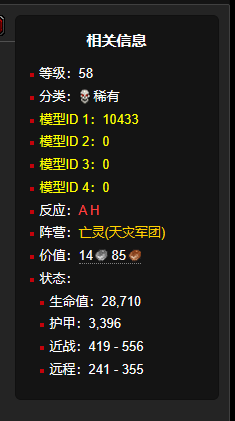
The right side of the webpage also displays the model ID (only available on the database platform provided by this website).
Query DisplayId by ITEM_ID
.heitu itemquery <item_id>Query the model ID corresponding to an item via its item_id.
This command is used when replacing bullet/arrow effects.
How to query item_id?
Open any WoW database website, for example http://db.heitu.org/80/?item=2164
Enter the item name you want to search in the search bar, or click the item category in the navigation bar, then click on a specific item.
Now look at the address bar: for example https://db.heitu.org/80/?item=2164 — the final 2164 is the item_id.
Query Nearby Objects (Game Objects) (Heitu version >= 1.10.28)
.heitu go near [distance]Distance defaults to 10 yards and can be customized.
.heitu go near 20
Queries all objects within 20 yards.
Query DisplayId by Object ID
.heitu gameobjectquery <object_id>Query the model ID corresponding to a game object (static object) via its object_id.
This command is used when modifying everything or changing static objects, such as enlarging the Silverleaf model.
How to query object ID?
Open any WoW database website, for example http://db.heitu.org/80/?object=1617
Enter the object name you want to search in the search bar, or click the object category in the navigation bar, then click on a specific object.
Now look at the address bar: for example http://db.heitu.org/80/?object=1617 — the final 1617 is the object ID.
Then use the command .heitu gameobjectquery 1617 to query the model ID.
Alternatively
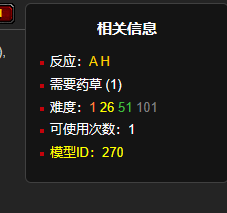
The right side of the webpage also displays the model ID (only available on the database platform provided by this website).
Change Gender
.heitu gender <gender_code>Changes gender. Code 0: Male, Code 1: Female. If no code is entered, it defaults to switching to the opposite gender.
Example
.heitu gender 1
Change Race
.heitu race <race_code> <safe>Changes race. Race codes are as follows:
- Human: 1
- Orc: 2
- Dwarf: 3
- Night Elf: 4
- Undead: 5
- Tauren: 6
- Gnome: 7
- Troll: 8
- Goblin: 9 // Turtle WoW only
- Blood Elf: 10
- Draenei: 11
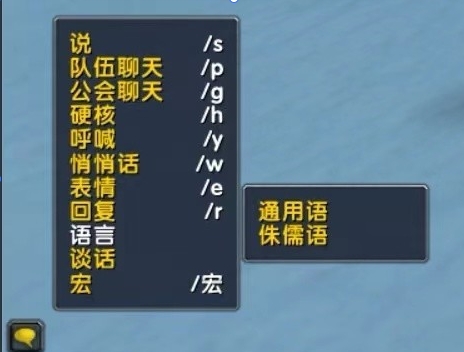
PS: If you change to a faction-opposing race and the chat prompts "You don't know this language," click the button in the upper-left corner of the chat box and select Language → Common.
Example
.heitu race 4 — Changes to Night Elf. Race appearance is perfect, but some addon incompatibilities may cause the game to crash (e.g., quest addons).
.heitu race 4 safe — Safely changes to Night Elf, but only the body is modified; the face remains from the original race. The advantage is no errors.
After changing race, some race-restricted mounts and equipment become unusable. What to do?
This will be optimized in the future.
Change Skin / Face / Hair / Hair Color / Features
.heitu skin <skin_code>
.heitu face <face_code>
.heitu hair <hair_code>
.heitu haircolor <hair_color_code>
.heitu features <feature/marking_code>
The above commands modify character appearance. Codes are auto-incremented starting from 0 — you can experiment on your own.
Example
For example, to change hair color:
.heitu haircolor 0
.heitu haircolor 1
.heitu haircolor 2
.heitu haircolor ........
You can try the commands one by one as above until you find the color you like.
Change Mount
.heitu mount <mount_DisplayId>IMorph Mount Code Sharing — Retail & Classic — NGA Player Community
The link above contains mount codes for both retail and classic. Please use codes available in classic. More mount IDs can be looked up independently.
Example
.heitu mount 10718 — Changes mount to Deathcharger's Reins.
Change Self Model
.heitu morph <model_DisplayId>Modifies the character model.
Example
Example: Become a skeleton: .heitu morph 7550
Change Self Model by NPC_ID
.heitu morphentry <NPC_ID>Modifies the character model, same as the above function but with a different parameter — input is NPC_ID.
Example
Example: Become Thrall: .heitu morphentry 4949
Smart Morph
.heitu enablesm — Enable Smart Morph
.heitu disablesm — Disable Smart Morph
When Smart Morph is enabled, this mode automatically bypasses existing transformations. Morphs such as Druid forms, Noggenfogger Elixir, and other transformations will not be overridden when present. (Default)
Change Equipment Appearance
.heitu item <slotId> <itemId>Changes equipment appearance. slotId values are as follows:
- Head: 1
- Shoulder: 3
- Back: 15
- Chest: 5
- Wrist: 9
- Hands: 10
- Waist: 6
- Legs: 7
- Feet: 8
- Main Hand Weapon: 16
- Off Hand Weapon: 17
- Ranged Weapon: 18
Example
.heitu item 16 19019 — Changes main hand weapon to Thunderfury. 16 is the main hand slot ID, 19019 is Thunderfury's itemId.
Change to Field Marshal set:
.heitu item 1 16478
.heitu item 3 16480
.heitu item 5 16477
.heitu item 10 16484
.heitu item 7 16479
.heitu item 8 16483
Change Model Scale
.heitu scale <0.1-30>Scales the in-game model size proportionally.
Change Everything
.heitu morphother <old_DisplayId> <new_DisplayId>Forcefully replaces models — substitutes the old model with a new one.
Supports replacing monster / NPC / player models — dynamically updated.
Supports replacing static object models, such as ground herbs and ores — requires relogging or encountering new objects for the change to take effect.
Example
Example: .heitu morphother 8869 1666
Replaces the Young Boar model in the Turtle WoW high elf starting zone with 1666 (random example). See above for how to query model DisplayId.
Note: Models generally fall into two categories:
- Dynamic models: movable models, such as players and monsters.
- Static models: immovable models, such as plants, ores, etc.
Dynamic models can only be replaced by dynamic models; static models can be replaced by either dynamic or static models.
Modifying dynamic models takes effect immediately. Modifying static models requires relogging or encountering new static objects in-game for the change to take effect.
Change Everything — Model Scale
.heitu scaleother <DisplayId> <0.1-30>Changes the scale of everything.
Example
Example: .heitu scaleother 8869 2
Sets the Young Boar model scale to 2 (doubles its size).
Change Weapon Enchant
.heitu enchant <weapon_slot> <enchantId>Changes weapon enchant. Weapon slots: main hand = 1, off hand = 2.
Example
Example: .heitu enchant 1 1900 — Apply Crusader enchant effect to main hand weapon.
How to find enchantId?
Enchant Weapon - Crusader - Spell
http://db.heitu.org/80/?spell=20034
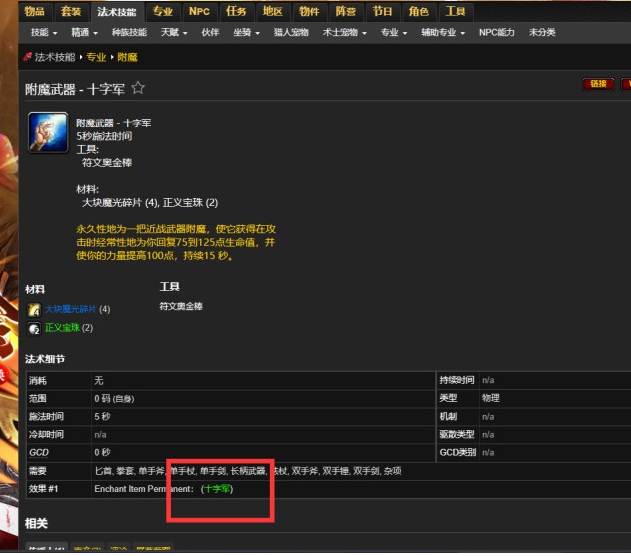
Click the green "Crusader" text.
http://db.heitu.org/80/?enchantment=1900
The 1900 appearing in the address bar is the enchantId for the Crusader effect.
Two additional enchant commands to share:
.heitu enchant 1 1.heitu enchant 2 2
Change Pet Model
.heitu morphpet <displayId>Changes pet model via displayId. See the morph command for usage details.
Example
.heitu morphpet 1666
Change Pet Model by NPC_ID
.heitu morphpet <NPC_ID>Changes pet model via NPC_ID. See the morphentry command for usage details.
Example
.heitu morphpetentry 4949
Change Pet Scale
.heitu scalepet <0.1-30>Changes pet size. Range: 0.1 - 30.
Example
.heitu scalepet 2
Change Shapeshift Form
.heitu shapeshift <displayId_of_a_form> <desired_displayId>Supports replacing a player's shapeshift form model with a desired model. (Druids rejoice!) After shapeshifting, use .heitu info to view the current form's displayId.
Example
.heitu shapeshift 892 1466
Replaces the Night Elf Druid's traditional Cat Form with the Pirate Captain model.
.heitu shapeshift 8571 1466
Replaces the Tauren Druid's traditional Cat Form with the Pirate Captain model.
Change In-Game Time
.heitu gamehour <0 - 23>Adjust the time of day in the game client, allowing for permanent daylight or nighttime.
Example
.heitu gamehour 3 — Always 3 AM
Change Weather
.heitu weather <0 - 3> <0.00 - 1.00>Changes weather. The first value is the weather type:
- 0 Clear
- 1 Rain
- 2 Snow
- 3 Storm
The second value is weather intensity.
Example
.heitu weather 0 0 — Clear skies.heitu weather 2 1 — Heavy snow
Change Ammo / Arrow Model
.heitu ammo <DisplayId>You can query the corresponding DisplayId using the (ITEM_ID to DisplayId) command.
Note: Only use DisplayIds corresponding to ammo. Using other models will cause bullets to appear as boxes.
Example
.heitu ammo 31814 — Ice Arrow
.heitu ammo 23211 — Rocket
Morph to Target
.heitu morphtargetChanges the player's model to match the target NPC's model and outputs the model modification command.